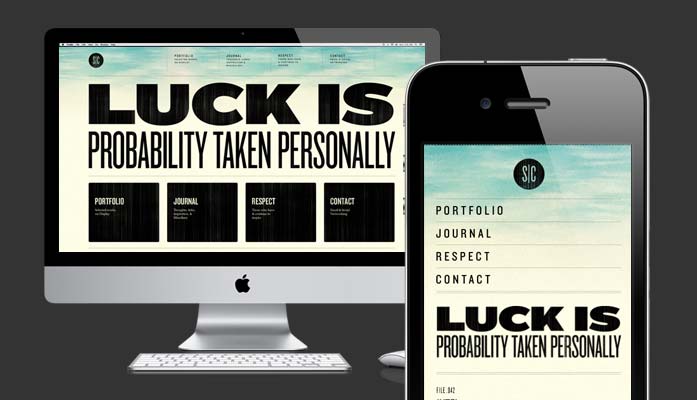
In the modern world of website design and development content is separated from its presentation. What you see when you visit websites through a browser is content moulded (and sometimes contorted) to a particular look-and-feel by files called cascading stylesheets – CSS for short. These files contain the rules that turn ordinary HTML (the scaffold of every page on the web) into visually appealing web pages.
Progress
HTML and CSS has slowly evolved over many years to offer more control and variety when developing and presenting web content.
Thanks to the proliferation of smartphones and tablets that use browsers pretty close to the cutting edge of web development, and as a counter to the world of mobile-specific apps and websites, there are many 'cool' things that can be done through websites – using HTML5, JavaScript engines and CSS3.
In amongst all these new and exciting methods is one that enables web designers to use CSS and some nifty technical hooks to target specific screen sizes, thus negating the need to produce multiple versions of the same website for different devices and platforms.
It goes by the name of responsive web design and was invented by Ethan Marcotte, a web designer and developer working out of Boston, Massachusetts. He wrote an article about it for A List Apart, a well respected digital journal, and wrote a book on the topic, too.
In detail
Create once, see it everywhere
The ability to target screen sizes, rather than devices is key to responsive web design. This means we can reach everything with a web browser: smartphones, tablets, TVs, games consoles and yes, possibly at some point, even fridges.
After all, being mobile these days can be a little disingenuous. You can be mobile on a MacBook Air (other laptops are available) with a 3G dongle, in a field somewhere, and be receiving a 'desktop' website. Or, you could be in a meeting using your office's wireless network (with broadband speeds) pinching and zooming on the same 'desktop' website on your new Galaxy S3 smartphone. (Or, if you're Tony Hawks, you can carry that fridge around.)
By targeting web browsers and screen sizes we have an optimal solution for delivering digital content to all sorts of customers who have all sorts of tools for interacting with your content – like mouses, keyboards, fingers and remote controls.
Here comes the science part
Just before we move on, though, I'll take this opportunity to bore you with the technique's dryer side: how it works.
The technique uses the CSS3 @media query within the website's stylesheets. These allow us to target specific screen sizes with the use of break points – custom CSS assigned to a particular maximum width size – all while the same content is being delivered to the customer's device. There are a couple of other things involved but I'll stop now as I can tell you've already had enough...
Suffice to say, if implemented, the use of a fluid layout in a website tied to the knowledge that your content will flex and adapt to fit whatever screen size it is viewed at, means this technique liberates web designers to deliver compelling, well thought through designs that enable their wider project team to focus on delivering quality content and services for their customers.
Industry conversations
There is much lively debate about this method among the web design and development community and it has its fair share of evangelists and critics. Mostly because it's new and shiny, partly because it competes with other methodologies, like mobile-specific websites or smartphone apps, so people will defend it and attack it for all sorts of reasons.
Usability guru Jacob Neilsen doesn't even discuss it in his recent Mobile vs Full Site article, claiming that he was “...writing about user experience, not implementation.” Some think it is boring, others want to take a measured approach. Whatever you think about this topic, it's a healthy industry that is open to constructive debate to push forward what's possible amongst peers and ultimately for clients.
What remains after the dust of debate has settled though, is that like any other method to building digital content, when used well and at the start of a project, coupled with good content strategy, graphic design and modern development practices it becomes a great foundation for a digital project. In the specific case of responsive web design it is one that can help keep ongoing costs low and customer experience high.
Counter to that though is treating it as a panacea for mobile ills. It does not work well when bolted onto an existing website as an afterthought, or as an attempt to 'cheat' your way to mobile-optimised success. This author knows, after implementing the technique, up-front, across a couple of National Trust projects (Planning for People and Your Space), that it needs to be closely entwined with a web project's remit for it to truly succeed. (Visit the websites on your small screen device, or just make a browser window on a big screen, narrower.)
For it to work successfully, the client has to first understand it and appreciate it and then want to genuinely re-think how they create and deliver digital content – before any implementation occurs. Responsive web design is just a part of a more holistic approach to web development and should not be treated as stand-alone feature.
That technical stuff is back again, hang in there...
There are a few technical niggles that need to be catered for when using this approach in your web project. The most important is data overheads. Because the same of amount of data comes down the line (whether it be office broadband or roaming 3G) care must be taken to not be sending large files (images, JavaScript and the like) to help deliver the content to the customers' devices, especially if they are accessing it on a mobile with network charges in place.
If there is one attitude this technique will encourage in a digital project, it is less is more.
To help out there are new techniques available to help load content on-demand on the customer's side, to lessen this affect, so the technique still has legs. But, at the risk of sounding like a broken record, responsive web design needs to be built in to a digital project from the ground up, so its limitations and potential are always in the spotlight as a web project progresses. These things are not necessarily a hindrance, rather a chance to focus the mind on what really needs to be delivered.
We got there in the end
So, I think we can safely say this technique is useful. Delivering consistent customer experiences without detriment to a business's message across all sorts of screen sizes, negating the need for a proliferation of bespoke websites or apps. But can it work out in the real world, with a respected brand that has a large customer base?
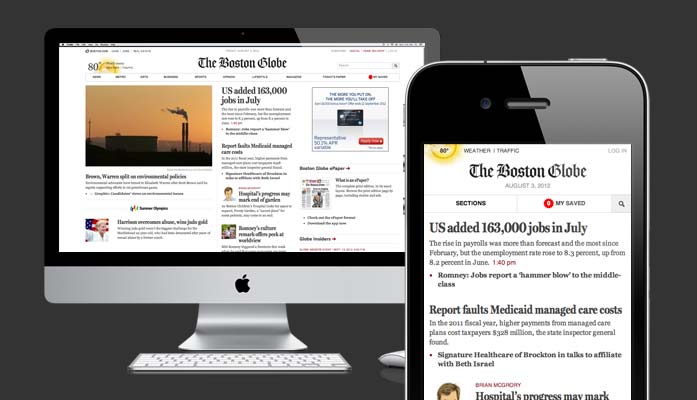
Yes. And one such example is The Boston Globe. Take a look around, on your small screen of choice, or just make your large screen browser narrower, to appreciate the effect.
The responsive website of The Boston Globe.
As part of their digital upgrade, this American newspaper decided to take the responsive web design approach, making sure that all its stakeholders had bought into the new ways of thinking about digital content before proceeding with its implementation. You can read more about that process on ReadWriteWeb, from the agency involved, Filament Group, and .net magazine's article.
Fin
Ultimately, all digital projects need to be steered by what their customers will get out of it. Any experience that doesn't put them first is liable to flounder (at much expense) so it pays to seriously consider what you want to achieve first before implementation, of any kind, is discussed.
However, I for one would like to see responsive web design in more digital projects (along with other cutting edge, open-source methods and technologies). But only if all involved are knowledgable about it, appreciate its strengths and weaknesses and are willing to invest in re-thinking how they work with digital content and creation.
Addendum
After this article was written, some further reading was discovered that while a little technical in places, should help to broaden the horizons of those looking to hear about the ups and downs of using the method on actual projects.
A inside take on the Crayola project from designer Dan Mall. The process they went through is of particular interest.
And a PDF that may interest you...
Yours, responsively is a PDF that collates some knowledge about RWD from a couple of presentations given by some clever people in the web design/development world.