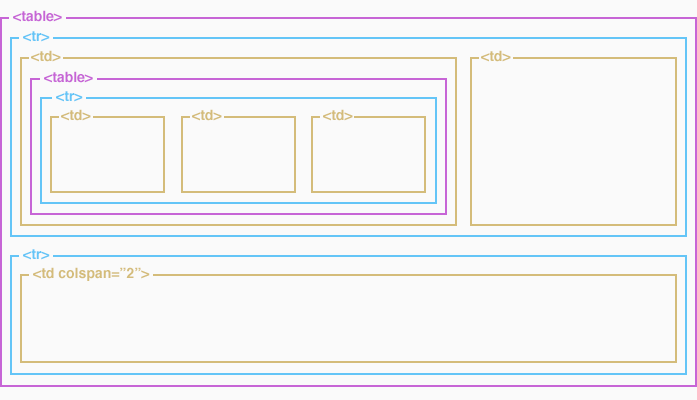
A simple HTML table
A simple table in HTML looks something like this:
| Newspaper | Size | Price | Circulation |
| Financial Times | Broadsheet | £1.20 | 350,000 |
| The Sun | Tabloid | 50p | 943,000 |
| Metro | Tabloid | Free | 265,000 |
Simple, huh? Great for spreadsheet-like data, but a little difficult to imagine how it might work for a complex layout where the flow of information isn't necessarily so regular. In fact, this is the prime reason table-based layouts are a big no no in the world of front-end web development – they were never meant for HTML layout.
But anyway, it is what it is and we have to work with it.
The three basic tags that make up the table are as follows:
<table><tr><td>
Our example table is constructed in HTML, a row (<tr>) at a time. Inside each row are four columns (<td>) with content written in the order displayed left to right. Here's the HTML:
- <table cellpadding="0" cellspacing="0" border="0">
- <tr>
- <td>Newspaper</td>
- <td>Size</td>
- <td>Price</td>
- <td>Circulation</td>
- </tr>
- <tr>
- <td>Financial Times</td>
- <td>Broadsheet</td>
- <td>£1.20</td>
- <td>350,000</td>
- </tr>
- <tr>
- <td>The Sun</td>
- <td>Tabloid</td>
- <td>50p</td>
- <td>943,000</td>
- </tr>
- <tr>
- <td>Metro</td>
- <td>Tabloid</td>
- <td>Free</td>
- <td>265,000</td>
- </tr>
- </table>