More and more people choose to access their email, not just on their laptop, but also on small-screen devices like smartphones.
This preference for access anywhere, anytime on any device will continue to grow.
So that we're not left floundering in the Stone Age the National Trust will be rolling out emails that utilise a shiny new, responsive template.
It's change we can believe in
The core template has been simplified to bring clarity to an email's central message, encourage a less is more attitude to content creation, reduce the overheads of development, improve email loading times and allow it to render really rather nicely on small-screen devices (and our usual favourites*) all in one package.
* I haven't fully tested it yet...
Getting started
If you're making an email, download the basic template to get started. It contains all the right bits for emails to be responsive and includes the always required header and footer sections.
Current features (as of 2012.09.24) include:
Modular set-up
Easier to copy-and-paste content and not get caught up in nested rows etc
Responsive layout
Works nicely on small and large screens, all in one template
NT logo at double resolution
Looks great on hi-res displays, like iPhone 4/4S/5 and iPad 3
Making your own
Herewith be some helpful information about working with this new email template.
An almost realistic depiction of how it works.
Swapping in and out content modules
This new template works in a more modular manner, so for every new piece of content you can grab a piece of code that'll do the required job. There are a few stalwarts that make up a new email, so let's just run through what they are and what they offer.
Assuming you have downloaded the main template, you can use the following code examples, given with each of the following section, to create a custom email.
Explanation
Every email template needs a little introduction, so we have what's called an 'explanation' part. This allows us to state the name of the sender (National Trust) and the subject of the email. It's primarily there so readers can understand who it's from in case their email client doesn't load images when they view the HTML email. It does repeat what the sender and subject matter will most likely say, but you can never be too obvious, eh?
Those viewing their email on a fancy gadget with a small screen won't see this as emails loaded on those devices generally load them right away.
<p style="color: #666666; font-size: 12px; line-height: 20px; margin: 0 0 10px;"><a href="http://www.nationaltrust.org.uk/" style="color: #666666; font-weight: bold;" class="appleLinksGrey">National Trust</a> – What is the email about?</p>
</td>
</tr>
</table>
</td>
</tr>
</table>
</td>
</tr>
</table>
<!-- End of Explanation -->
Look at those lovely tables...
Introduction
Hang on, weren't we just on about introductions? Yes... well... ahem, this is the actual introduction. It contains all the good bits, namely the organisation's logo, the email's salutation (not always necessary, so just remove that text if it's not required (not it's column, mind)), the email's title and a follow up paragraph.
No email should be produced without this part. You have been warned.
<p class="mainTitle" style="color: #410546; font-size: 26px; font-weight: bold; line-height: 32px; margin: 0;">New stock for a new season</p>
</td>
</tr>
<tr>
<td height="12"></td>
</tr>
<tr>
<td>
<!-- Secondary title -->
<p class="subTitle" style="color: #666666; font-size: 14px; line-height: 22px; margin: 0;">We have some exciting new and exclusive items available to buy online now including some great offers and items from our growing Artists and Craftsmen section. Plus for a limited time we are offering free p&p on orders over £50.</p>
</td>
</tr>
<tr>
<td height="20"></td>
</tr>
</table>
</td>
</tr>
</table>
</td>
</tr>
</table>
</td>
</tr>
</table>
<!-- End of intro -->
...nice flat-pack table, minimal instructions
Images
Due to the limitations of many email clients and the fact that this new approach is accommodating small screen devices with a responsive, table-based layout, we have to use much simpler imagery.
This has a two benefits. Firstly, it means less are required and so loading times will hopefully reduce. Secondly they need to flex with the responsive layout and the only way to do that easily in a table-based layout is to just make them fit the width of the email.
If you're concerned that emails may not look quite as exciting as previous attempts, fret not. We can still make images that excite, by playing with montages running into the white background, or using graphical shapes to intersect paragraphs of copy. There is still potential to have interesting visuals within emails.
More importantly though, this approach means our responsive layout can work effectively across multiple screen types without too much hair-pulling on our part to accommodate all the wonderful idiosyncrasies of email development.
Remember to change the image's path to the image you expect to appear
Text
Right. Text. We all love it and we all want to use it. You get quite a few options for displaying text in email templates. In fact, you're free to whack any amount of inline styles on your text to make it look fancy (or not). However, here's a few options of text scaffolding that you can always rely on and so you only have to change the text, not the tags.
The drawer effect
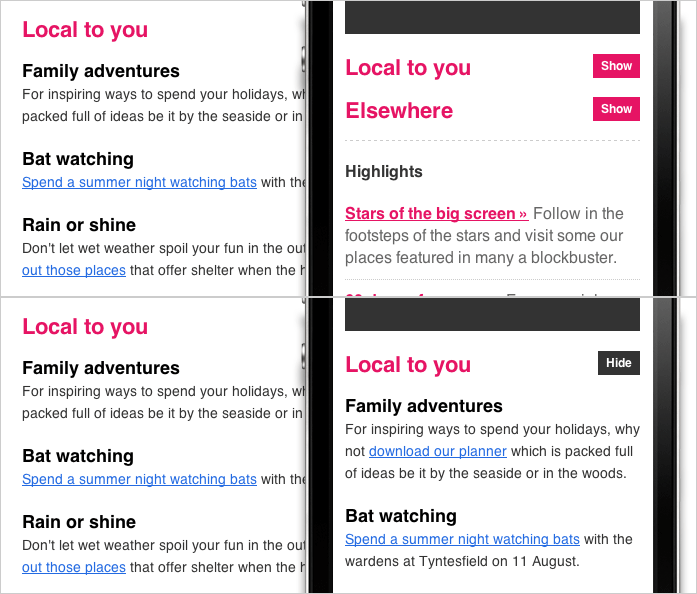
Because we like shiny new things you can have sections of copy that display in full on nice big screens but then temporarily hide on small screen devices – perfect for minimising how much scrolling is required as customers can just press the 'Show' button to reveal the content.
<!-- Drawer text hidden for small screens, exposed for large screens -->
<p style="color: #333333; font-size: 14px; line-height: 22px; margin: 0 0 20px;">For inspiring ways to spend your holidays, why not <a href="" style="color: #246be2;" class="appleLinksBlue">download our planner</a> which is packed full of ideas be it by the seaside or in the woods.</p>
<p style="color: #333333; font-size: 14px; line-height: 22px; margin: 0 0 20px;"><a href="" style="color: #246be2;" class="appleLinksBlue">Spend a summer night watching bats</a> with the wardens at Tyntesfield on 11 August.</p>
<p style="color: #333333; font-size: 14px; line-height: 22px; margin: 0 0 20px;">Don't let wet weather spoil your fun in the outdoors. Embrace the elements and <a href="" style="color: #246be2;" class="appleLinksBlue">seek out those places</a> that offer shelter when the heavens open.</p>
</td>
</tr>
</table>
</td>
</tr>
</table>
</td>
</tr>
</table>
</td>
</tr>
</table>
<!-- End of drawer text -->
The drawer effect HTML.
How the drawer effect looks
On the left is the text as it would render on large screens (everything above a width of 480px) and on the right, the small screen version with the drawer effect.
On small screens, this image demonstrates how the drawer effect works.
Highlights
Alternative way to show text, kind of like a list, but neater and easier to deal with.
<p style="border-bottom: 1px dotted #ccc; color: #666666; font-size: 16px; line-height: 22px; margin: 0 0 10px; padding: 0 0 10px;"><a href="" style="color: #410546; font-weight: bold;" class="appleLinksPurple">Stars of the big screen »</a> Follow in the footsteps of the stars and visit some our places featured in many a blockbuster.</p>
<p style="border-bottom: 1px dotted #ccc; color: #666666; font-size: 16px; line-height: 22px; margin: 0 0 10px; padding: 0 0 10px;"><a href="" style="color: #410546; font-weight: bold;" class="appleLinksPurple">60 days of summer »</a> From special events to hidden gems, explore our week-by-week guide for great days out.</p>
<p style="color: #666666; font-size: 16px; line-height: 22px; margin: 0 0 20px;"><a href="" style="color: #410546; font-weight: bold;" class="appleLinksPurple">Three months' free »</a> Join online today for instant membership. Plus, pay by Direct Debit and get three months' free.</p>
</td>
</tr>
<tr>
<td style="border-top: 1px dashed #cccccc;"></td>
</tr>
<tr>
<td height="20"></td>
</tr>
</table>
</td>
</tr>
</table>
</td>
</tr>
</table>
<!-- End of Highlights -->
Not bad for a fake list
Footer
There's always a place for addresses, terms and conditions and unsubscribe links. Our new layout still has time for these old friends, so you'll need to make sure you plonk in this trusty section.
<p style="color: #666666; font-family: Helvetica, Arial, Verdana, sans-serif; font-size: 12px; line-height: 20px; margin: 0 0 15px;">The National Trust is a charity and is completely independent of Government. We rely for income on membership fees, donations and legacies, and revenue raised from our commercial operations.</p>
<p style="color: #666666; font-family: Helvetica, Arial, Verdana, sans-serif; font-size: 12px; line-height: 20px; margin: 0;"><a href="http://www.nationaltrust.org.uk/main/w-global/w-terms_conditions/w-privacy_policy.htm" style="color: #666666; font-weight: bold;" class="appleLinksGrey">Privacy Policy</a> – <a href="http://www.nationaltrust.org.uk/main/w-global/w-contact_us.htm" style="color: #666666; font-weight: bold;" class="appleLinksGrey">Enquiries</a>. If you no longer wish to receive emails from us <a href="http://preferences.nationaltrust.org.uk/ntmainunsub/unsub.aspx?cmd=Login&DMEmailAddr=#EmailAddr#" style="color: #666666; font-weight: bold;" class="appleLinksGrey">please unsubscribe here</a>.</p>
</td>
</tr>
<tr>
<td height="30"></td>
</tr>
</table>
</td>
</tr>
</table>
</td>
</tr>
</table>
<!-- End of footer -->
Important, because it let's people know things (and unsubscribe)
In conclusion
The great thing (don't overdo it, will you?) about this new layout is its ease-of-use. You should be able to easily cut-and-paste whatever combination of content (text, images) you need to make any new email. The world is a mollusc of your choosing!
Customer support
Fancy pictures
When you need fancy, professional looking images for email, let the digital design team know and they'll be happy to share their crayons with you.
Dodgy codeage
If you need help with those crazy inline styles to achieve certain effects, or your mark-up is playing silly buggers then the digital design team is ready to take your call.