Yes. I am. Because when we've had a full moon, I love to tinker and make cool demos.
The team at Future Friendly have collated some quite good resources for web content, design and development. From a technical angle, work by Brad Frost proved particularly helpful in me attempting to, one, go against my first article by implementing responsive design onto our existing site and two, making the task of creation that much quicker.
Those who cannot change their minds cannot change anything
Another aim of this self-initiated project was to play with Twitter's Bootstrap project. The beauty of frameworks like these is that the hard work involved in defining CSS for layout, typography, forms and more is done for you. While our current efforts use a version of 960 grid it never had the wealth of detail for typography and forms (or any responsive-ness) so we had to build that as we went*. Twitter's Bootstrap enabled me to work quickly, allowing pages of content to be created almost just by adding the relevant class name.
Don't reinvent the wheel, just realign it.
Using a framework does mean you're relying on someone else's goodwill and there are visual concerns than could mean your site's design looks like every other instance of the framework, but ease-of-use and speed greatly out weigh these (temporary) cons – especially for demonstrations like this one.
* Which in places has led to quite a few hacks and custom solutions to problems already solved by others.
Show me the good stuff
With the preamble out of the way, let's get to the good stuff.
Links will be provided at the end (yes, you did read that correctly – this is an alcohol-free zone), but I'll take a little more of your time by explaining some of the detail and pros and cons to this particular responsive approach.
The header
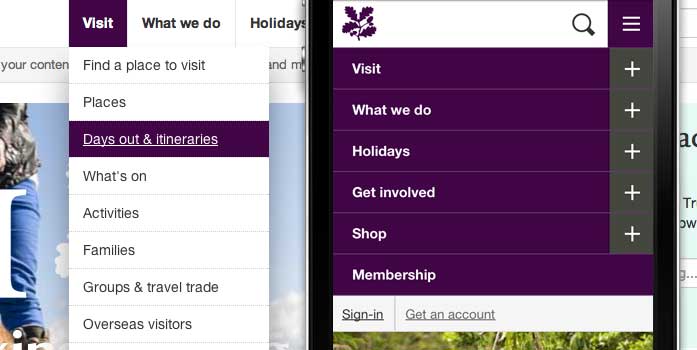
The trickiest part of this demo was working with the existing IA. Thanks to a multi-level menu pattern lifted from the Responsive Patterns site, I was able to create a menu that works with hover dropdowns on large screens and with presses on smaller screens (typically touch enabled devices). Each instance appears slightly different, but they all show the same information. However, some work will need to be done to better organise these menu items so as to optimise the experience.
A future-proof addition is that of a sign-in/get an account bar. This is recognising that customers will need an account to get the best of the Trust's digital services. The sign-in pop-up works particularly well whatever the screen size, and should allow for customers to log-in with third-party services like Facebook and Twitter. The content of this bar would change when a customer is logged in, showing their name and the chance to log out.
How the main menu looks and works across different screen sizes.
Pros and cons
Pros
Cons
Looks pretty good, whatever the device
Existing IA could be seen as over-complicated
Compresses many key things quite well in a small space (uses icons to save space)
May take some customers a while to become familiar/confident with it
Shallow height means more content is seen on most screen sizes
The visual identity has been lessened (in comparison to existing site)
The footer
Possibly earlier than expected, let's talk about the footer. This has not been massively changed from the existing version, but I did take the opportunity to move a few things around and tidied up the ordering of links. The silhouette images remain, but in a different guise. If you're looking at these pages on a high resolution display, you should notice improved quality as we switch which version is shown dependent on the device. Customers on smaller screen devices won't see this image as it just gets in the way. If you are viewing it on a small screen and comparing it to the large screen version you'll notice a difference in layout. I amended this so you have easier access to the contact and about buttons and have a show/hide feature for the extra things that aren't necessarily as important.
For those paying attention, we could have got much more serious about following the mobile first way of thinking and scaled up the ease-of-use of the small screen footer to the large screen, but I didn't. This work is mostly a sticking plaster approach (with a few unique features) to the responsive approach (the very one I argued against) but for the sake of moving things forward, this is the way I've done it.
Pros and cons
Pros
Cons
Modifies well across screen sizes
Could be seen as too much information in one place
Home page
The Twitter Bootstrap approach allows us to maintain our four column approach (and any combination thereof) as well switching to three column layouts (see Search page later on in this article). The home page showcases familiar content, with a few changes by me to simplify what gets displayed and how the hero unit can work.
Simplification of widgets is key to a successful transition of National Trust content to a responsive layout. We may have to consolidate certain features because of their reliance on heavy JavaScript add-ons and their inabilities to easily scale between screen sizes.
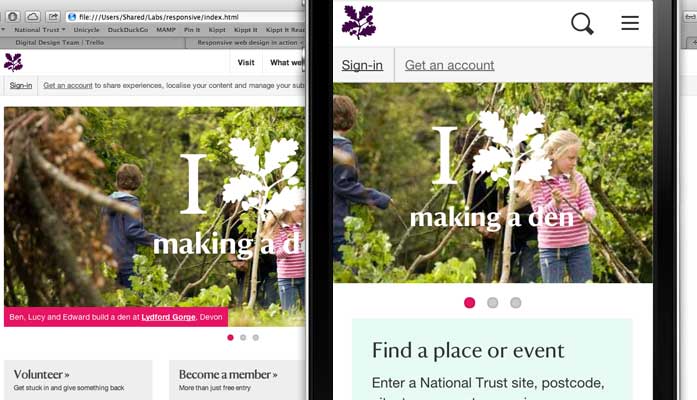
The new slideshow (the brilliant Flexslider) demonstrated on this home page uses lighter JS elements and enables touch events so customers can swipe between slides rather than (or, rather, as well as) press the slide counters. I've demonstrated the potential of displaying the 'I Oak Leaf' campaign in this slideshow.
Large screen version of the home page and the same content adapting responsively on a small screen.
Familiar elements like the 'Find a place or event' widget exist, alongside staple call to actions such as donating and becoming a member. Again, these have been simplified to work harder across multiple screen sizes. In an ideal world, the 'Find a place or event' widget would take people through to the unified search page.
Pros and cons
Pros
Cons
Simplifies content helping key messages stand out
Lacks variety among tiles
Search
With the prospective work happening to bring in a unified search feature, I took the work Nomensa had started and created a search page that works pretty darn well across multiple screen sizes.
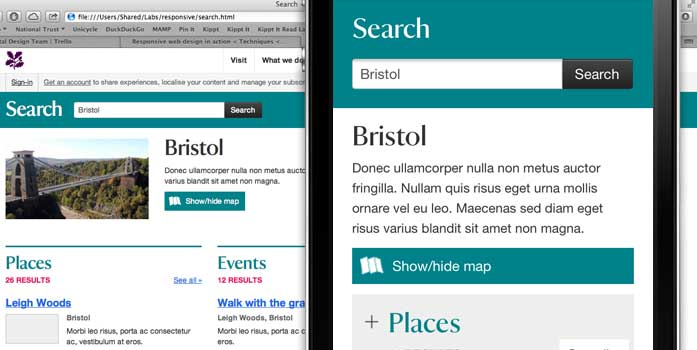
Take a look on your large and small screen browsers to see the difference between displaying results. To conserve space (and prevent unnecessary scrolling) the small screen version compresses each 'unit' of results into a smaller space. Customers just press the header to reveal the first few results. On the large screen version the same information is displayed immediately.
Large and small screen version of the search page showcasing optimised layouts for each size.
Even the map works... thanks Open Street Map!
Pros and cons
Pros
Cons
Consolidates a lot of information well on all screen sizes
What's not to like?
Other pages
There are a few other pages that I created. Those are: about us; contact us; news and videos (and a video page, too). There isn't much to say about these as they are all conventional pages with little in the way of customisation. On small screens though, where a left hand menu is present, the links are compressed into a show/hide box so as to avoid excessive scrolling. It remains to be seen whether this is a valid feature for those using small screen devices.
Grey areas
A few other things to note about this demo is its inability to work particular well at mid sizes such as an iPad in portrait mode. A four column layout is ideal for getting lots of content on a page, but some serious thought (or a lot of CSS overrides) would have to be done to get the best out of a responsive site using Twitter Bootstrap at this screen size. Long titles run onto two lines making some pages' content appear staggered and custom widgets need a lot of love to work and look correct.
The trouble with tablet sizes (particularly in portrait mode) is that they sit between a conventional desktop size and a optimal smartphone size, which means most content is displayed at desktop size but has to fit into the space of an oversized phone... this is another problem to be properly thought through when building a responsive site.
The live examples that use Twitter Bootstrap invariably don't use more than a three column layout – content is more focussed and layouts more accommodating – so at least this demo has helped raise an issue we may never have encountered until too late.
Conclusions
So here we are at the end. That took a little longer than I expected, but I hope that you've now got a better sense of the potential of responsive design being used on the National Trust website.
One thing this does do is reinforce the mobile first methodology to creating content and layouts. Less really is more and getting it right (and optimised) for smaller screen devices is the first thing to be done. On the way we'll find where we can expand, but with the fastest-growing digital device segment in mind, we'll be half-way there by keeping it small.
Oh, and I almost forgot. Here's the link to the demo: National Trust RWD